This is a professional-grade creative direction for your project. The "Streetwear Grunge" aesthetic works perfectly for a digital tool because it positions the utility as "edgy, fast, and raw" rather than just another boring corporate website.
### 1. [Visual Prompt]
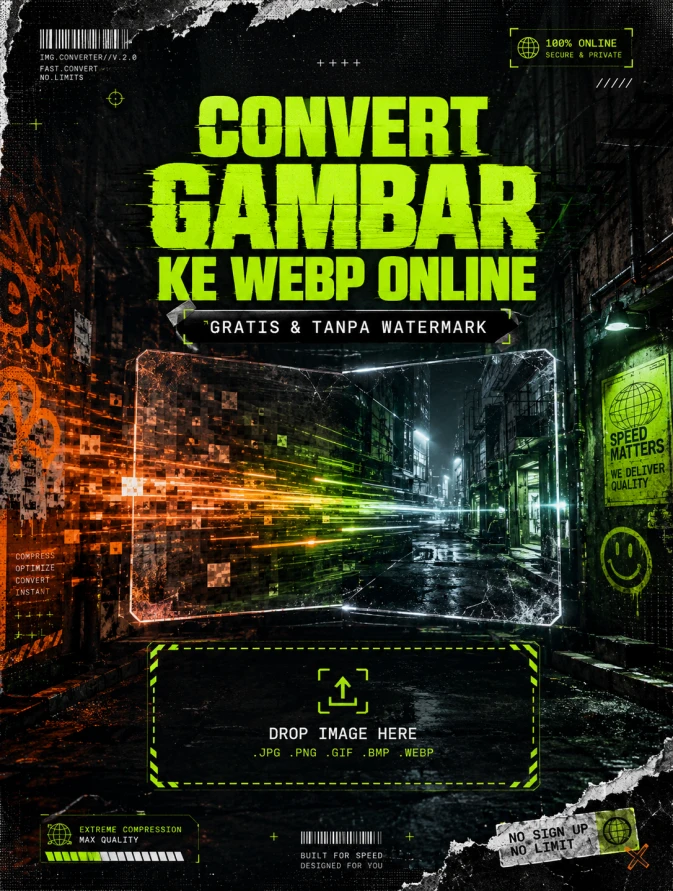
> **A high-impact, professional promotional poster background for a digital image converter tool. The aesthetic is "Streetwear Grunge" and "Urban Industrial." Central visual features a large, distorted glowing digital frame or a transparent glass pane with motion-blur artifacts, symbolizing image processing. The background is a dark, moody concrete alleyway with flickering neon green and emergency orange lighting. Incorporate heavy xerox-style textures, 35mm film grain, halftone screen patterns, and distressed paper-tear edges. Dynamic "data-flow" light streaks move from left to right, transitioning from pixelated/glitchy blocks to sharp, high-definition clarity. High contrast, raw energy, ultra-detailed textures, 8k resolution, shot on a wide-angle lens for a cinematic urban feel. Negative space in the upper-middle and bottom-third for typography.**
***
### 2. [Agency Layout Tip]
To maintain the **Streetwear Grunge** aesthetic while ensuring the tool looks professional, follow this layout hierarchy:
* **The Hero Title ("Convert Gambar ke WebP Online"):** Use a bold, **Brutalist Sans-Serif font** (like *Impact*, *Druk*, or *Helvetica Compressed*). Place it in the upper-middle section. Apply a slight "glitch" or "offset path" effect to the text. Use a high-contrast color like **Neon Lime Green** against the dark background.
* **The Sub-title ("Gratis & Tanpa Watermark"):** Place this directly beneath the title in a smaller, monospaced font (like *Roboto Mono* or *Courier*) to give it a "technical/coding" vibe. Frame this text in a solid black "label" box or wrap it in a "duct tape" texture overlay.
* **The CTA (Call to Action):** If you are adding a "Drop Image Here" box, make the border look like **industrial hazard tape** or a dashed technical line.
* **Finishing Touch:** Overlay a very subtle "scanline" or "dust & scratches" texture over the *entire* flyer after the text is added to unify the typography with the background image.
RASIO 3:4
👁 428
Home
/
Webapp | Spaces | Webapp Converter /
Convert Gambar ke WebP Online Tanpa Watermark |
DekaNon Labs
Convert Gambar ke WebP Online Tanpa Watermark
Labels
Web App
★★★★★ |
Featured Tool |
Our recommended tool.
Convert to WebP (Batch)
*Maksimal upload 30 gambar*
Klik atau Drag & Drop gambar disini
Tool Convert to WebP — Cepat, Gratis, Maksimal 30 Gambar
WebP adalah format gambar modern yang jauh lebih ringan dibanding JPG atau PNG tanpa mengurangi kualitas visual. Format ini sangat direkomendasikan untuk website, terutama WordPress, karena dapat meningkatkan kecepatan loading dan performa SEO.
Melalui halaman ini, kamu bisa convert gambar ke WebP secara gratis, tanpa install software dan tanpa watermark. Cukup upload gambar (maksimal 30 file), klik convert, dan hasilnya langsung bisa di-download.
✅ Fitur Tool WebP Converter:
Convert banyak gambar (batch) hingga 30 file sekaligus
Mendukung format JPG, PNG, JPEG
Hasil otomatis rename sesuai nama file asli
Tanpa watermark
Proses cepat — semua dilakukan langsung di browser
Aman — gambar tidak dikirim ke server (diolah di device kamu sendiri)
Cara Menggunakan:
Klik area upload atau drag & drop gambar ke dalam kotak.
Tunggu sampai preview gambar muncul dalam bentuk grid.
Klik tombol Convert Semua ke WebP.
Setelah selesai, klik Download Semua untuk mengunduh hasil.
Tidak perlu menunggu antrian dan tidak ada batasan harian — bebas digunakan kapan saja.
Kenapa WebP Penting Untuk Website?
✔ Ukuran file lebih kecil → website lebih cepat
✔ SEO lebih kuat → Google menyukai website yang cepat
✔ Menghemat storage & bandwidth hosting
✔ Cocok untuk WordPress, Blogger, Shopify, dan marketplace
Jika kamu punya website atau toko online, menggunakan WebP adalah salah satu cara paling mudah untuk meningkatkan performa loading dan pengalaman pengguna.
Gunakan tool ini setiap kali kamu ingin optimasi gambar untuk website atau postingan media sosial.