Here is a professional creative direction and technical prompt for your promotional flyer.
### 1. [Visual Prompt]
**Model: Midjourney v6 / DALL-E 3**
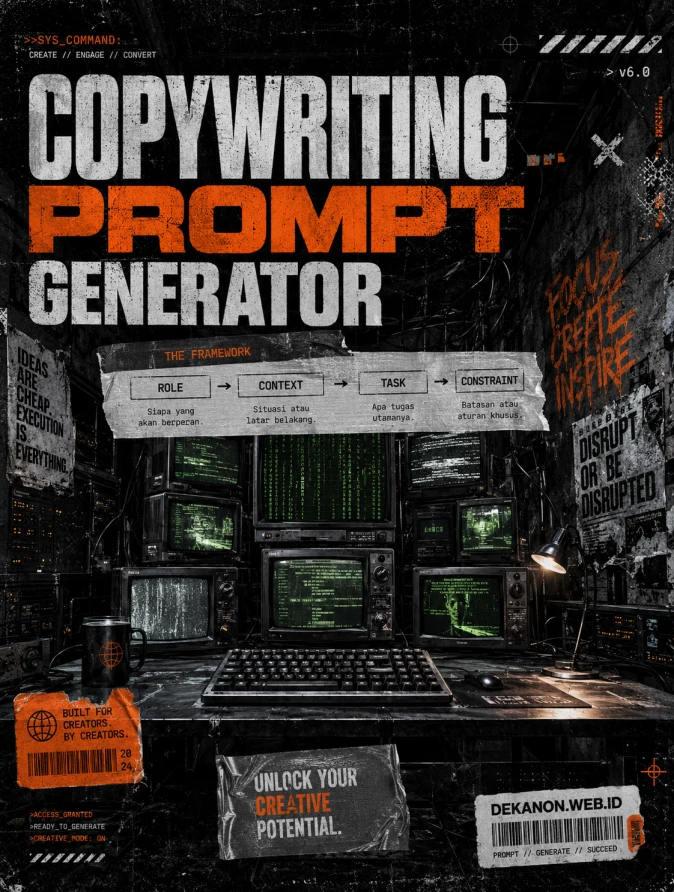
> **Prompt:** A professional streetwear-style promotional poster background featuring a "Digital Command Center" in a gritty, urban underground setting. The central focus is a stack of weathered, vintage CRT monitors flickering with abstract green code and data streams. The aesthetic is high-contrast "Streetwear Grunge": heavy film grain, Xerox-photocopy textures, raw concrete walls, and tangled industrial wires. Harsh flash photography lighting creates deep, moody shadows. Visual elements include duct tape textures, subtle glitch distortion, and a raw, punk-rock energy. In the foreground, a metallic workspace with a modern mechanical keyboard. The color palette is dominated by charcoal grey, tactical black, and stark white, with a single high-visibility "Electric Orange" accent color. 8k resolution, brutalist composition, wide-angle lens, extremely detailed textures. --ar 4:5 --v 6.0 --stylize 250**
---
### 2. [Agency Layout Tip]
To maximize the "Streetwear Grunge" aesthetic, follow this layout hierarchy in your design software (Photoshop/Canva):
* **The Hero Title (Copywriting Prompt Generator):** Use a massive, bold Sans-Serif font (like *Helvetica Bold* or *Integral CF*). Apply a "distressed" or "stamped" effect to the letters. Place this in the top third of the flyer, slightly overlapping the visual elements to create depth.
* **The Framework (Sub-title):** Present "Role → Context → Task → Constraint" as a linear flow-chart. Use a monospaced font (like *Courier* or *Roboto Mono*) to give it a "technical/coding" feel. Place this inside a "duct tape" or "label sticker" graphic element in the center of the image.
* **The URL (DEKANON.WEB.ID):** Place this at the very bottom, right-aligned. Use a small, clean font. To stay on-brand with the streetwear theme, put it inside a small "Barcode" or "Price Tag" graphic.
* **Texture Overlays:** After placing your text, add a final "Dust & Scratches" or "Paper Grain" overlay across the *entire* design. This binds the text and the background together, making it look like a physical poster pasted on a city wall.
Buat perintah AI super detail dan terstruktur menggunakan puluhan kombinasi taktik copywriting profesional.
🚀 Hasil Prompt Siap Salin
Isi form di sebelah kiri untuk meramu instruksi terbaik Anda...
💡 Konsep Tool: Prompt Generator
Tool ini akan membantu pengguna menyusun prompt berkualitas tinggi menggunakan formula standar industri copywriting (Role → Context → Task → Constraint). Pengguna cukup mengisi beberapa kolom sederhana, dan boom! Hasil prompt matang yang siap di-copy langsung jadi.
Kenapa Tool Ini Menarik?
Sangat Dibutuhkan: Di era AI saat ini, orang-orang butuh cara cepat membuat prompt tanpa perlu belajar rekayasa prompt (prompt engineering) yang rumit.
Interaktif & Instan: Saat pengguna mengganti pilihan atau mengetik, teks di panel kanan akan otomatis berubah secara real-time.
Ringan & Aman: Skripnya diringkas sedemikian rupa, berjalan murni di sisi semua browser.