Cara Pakai & Syarat DekaNon Auto SEO AI
Panduan agar plugin berjalan dengan baik — mulai dari syarat minimum, instalasi, konfigurasi API gratis, hingga troubleshooting shared hosting. Ikuti urutan dari atas ke bawah.
1. Syarat Minimum Agar Berjalan Normal
Semua syarat di bawah harus terpenuhi minimal pada level yang dicontohkan. Yang paling wajib: WordPress + PHP 7.4+ + minimal 1 API key AI + koneksi internet keluar.
| Komponen |
Kebutuhan |
| WordPress |
Versi 5.6 atau lebih baru (Application Password opsional). |
| PHP |
Versi 7.4+ (disarankan 8.0+). Wajib ada ekstensi cURL, JSON, OpenSSL (untuk Google Indexing). |
| Hak Akses |
Peran Administrator (capability manage_options) untuk membuka menu plugin. |
| API AI (minimal 1) |
API key salah satu: Gemini, Groq, Cerebras, Z.AI, atau OpenAI. Gratis kecuali OpenAI. |
| Koneksi Internet |
Hosting harus bisa melakukan HTTP request keluar ke API AI dan layanan indexing. |
| WP-Cron |
Aktif (default). Bila dimatikan via DISABLE_WP_CRON, gunakan tombol Run Now atau cron server. |
Minimum Paling Aman: WordPress + PHP 8.0 dengan cURL & JSON aktif, 1 API key Google Gemini (gratis), dan koneksi internet keluar. Itu saja sudah cukup menghasilkan artikel. Gambar (Pexels), internal link, dan Google Indexing adalah fitur tambahan opsional.
2. Instalasi Plugin
- Unduh file
dekanon-auto-seo-ai.zip dari halaman beranda.
- Masuk WordPress admin → Plugins → Add New → Upload Plugin.
- Pilih file ZIP → Install Now → tunggu selesai.
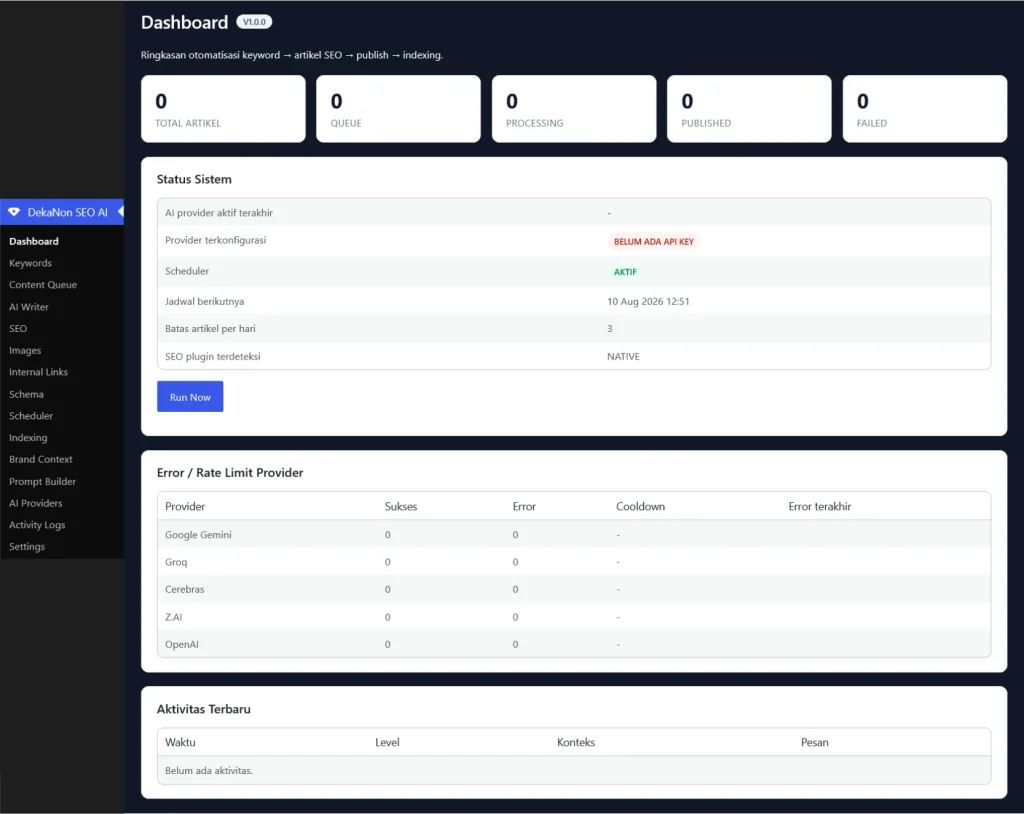
- Klik Activate. Menu DekaNon SEO AI akan muncul di sidebar admin.
- Saat aktivasi, plugin otomatis membuat tabel database & menjadwalkan WP-Cron tiap 5 menit. Tidak perlu setup manual.
3. Dapatkan API Key AI Gratis
Ambil minimal satu. Semakin banyak provider terisi, semakin kuat fallback-nya saat satu kena rate limit.
| Provider |
Ambil API Key |
Catatan |
| Google Gemini |
aistudio.google.com/apikey |
Gratis, model gemini-2.0-flash. Paling mudah didapat. |
| Groq |
console.groq.com/keys |
Gratis, sangat cepat. Daftar → API Keys → Create. |
| Cerebras |
cloud.cerebras.ai |
Gratis, model llama3.1-8b. |
| Z.AI |
z.ai (console) |
GLM-4-Flash free tier. |
| OpenAI |
platform.openai.com/api-keys |
Berbayar — opsional, hanya jika Anda punya kredit. |
| Pexels (gambar) |
pexels.com/api |
Gratis, untuk featured image otomatis. Opsional. |
Masukkan key di menu AI Providers, klik Simpan, lalu klik Tes di tiap provider. Lihat kolom Sukses bertambah = koneksi sukses.
4. Konfigurasi Menu (Urut Atas → Bawah)
- AI Providers — isi API key & tes: Buka menu AI Providers, tempel minimal satu API key (mis. Gemini), klik Simpan, lalu klik tombol Tes. Lihat kolom Sukses bertambah = koneksi berhasil. Atur urutan fallback: provider pertama gagal → otomatis pindah ke provider berikutnya.
- Brand Context — identitas brand: Isi nama brand, website, deskripsi bisnis, layanan, lokasi, gaya penulisan. Data ini otomatis disisipkan ke setiap prompt AI melalui variabel
{brand}. Boleh kosong, tapi artikel lebih konsisten bila diisi.
- Settings — aturan konten: Tentukan bahasa (Indonesia), panjang artikel (1000 kata default), status publish (publish/draft/pending), penulis, kategori default, aktifkan FAQ. Untuk shared hosting: panjang artikel ≤ 1200 kata.
- Keywords — tambah keyword: Tempel daftar keyword, satu per baris. Centang 'Langsung masukkan ke Content Queue' agar otomatis masuk antrean. Atau klik tombol Generate per keyword.
- Scheduler — otomatisasi: Aktifkan scheduler, set batas artikel per hari (mis. 3) dan batch size 1–2 untuk shared hosting. WP-Cron jalan tiap 5 menit memproses satu job per eksekusi agar tidak timeout.
- Run Now / tunggu otomatis: Klik Run Now di Dashboard untuk memproses langsung via worker AJAX, atau biarkan scheduler berjalan otomatis. Pantau progres di Content Queue.
- SEO, Images, Internal Links, Indexing: Default sudah aktif (mode auto: deteksi Yoast/Rank Math atau native). Images butuh API Pexels. Internal link otomatis menautkan artikel baru ke artikel lama yang relevan. Indexing kirim ke Bing IndexNow + ping sitemap.
5. Cara Kerja Pipeline (Anti-Timeout)
Setiap keyword diproses satu step per eksekusi agar tidak timeout di shared hosting. Satu artikel butuh ~9 eksekusi cron (atau beberapa klik Run Now) untuk selesai.
title →
outline →
article →
faq →
seo →
publish →
image →
links →
index
Job gagal otomatis diulang sampai batas percobaan (default 3×). Job macet di status processing lebih dari 10 menit dipulihkan otomatis ke antrean.
6. Cara Cepat: Satu Artikel Langsung
Buka menu AI Writer → isi satu keyword → centang "Proses langsung" → klik Generate. Plugin memproses seluruh pipeline sekaligus (sampai 12 step) di latar belakang. Cocok untuk uji coba cepat tanpa menunggu cron.
7. Pengaturan Indexing
- Bing IndexNow: Aktif default, key verifikasi dibuat otomatis. File verifikasi tersedia di
domain.com/{key}.txt. Tidak perlu konfigurasi.
- Sitemap ping: Aktif default. Otomatis ping Bing saat artikel terbit.
- Google Indexing API: Opsional. Butuh Service Account JSON (Google Cloud Console) + ekstensi OpenSSL di hosting. Plugin hanya mengirim permintaan submission — tidak menjamin URL terindeks.
8. Troubleshooting
| Masalah |
Solusi / Langkah Perbaikan |
| Job stuck / tidak jalan |
Cek Scheduler aktif. Bila WP-Cron dimatikan, pakai tombol Run Now atau cron server: wget -qO- 'https://domain.com/wp-cron.php?doing_wp_cron'. Job macet >10 menit dipulihkan otomatis. |
| Semua provider gagal |
Pastikan minimal 1 API key terisi & lulus Tes di AI Providers. Klik 'Reset Statistik & Cooldown' bila semua provider kena cooldown. Isi beberapa provider agar fallback berfungsi. |
| Artikel tidak terbit |
Cek Settings → status publish. Bila 'draft', artikel tersimpan sebagai draft. Cek Content Queue apakah ada job status failed — klik Retry. |
| Gambar tidak muncul |
Isi API Pexels di menu Images. Tanpa Pexels, step image dilewati otomatis — artikel tetap publish tanpa featured image. |
| Google Indexing API gagal |
Butuh Service Account JSON + ekstensi OpenSSL aktif di hosting. Bila tidak ada, matikan opsi Google Indexing — IndexNow & sitemap ping tetap jalan. |
| Timeout di shared hosting |
Turunkan batch size ke 1, panjang artikel ≤ 1200 kata, aktifkan ajax_worker. Pipeline memproses satu step per eksekusi sehingga aman dari batas waktu hosting. |
9. Checklist Cepat Sebelum Mulai
- Plugin ter-install & ter-aktivasi (menu DekaNon SEO AI muncul)
- Minimal 1 API key AI terisi & lulus tombol Tes
- Brand Context & Settings sudah diisi (minimal bahasa & status publish)
- Scheduler aktif, batch size 1–2 untuk shared hosting
- Pantau Content Queue & Activity Logs saat pertama jalan